

BuildValue: Forza in an application
Open BuildValue · Explore Forza components
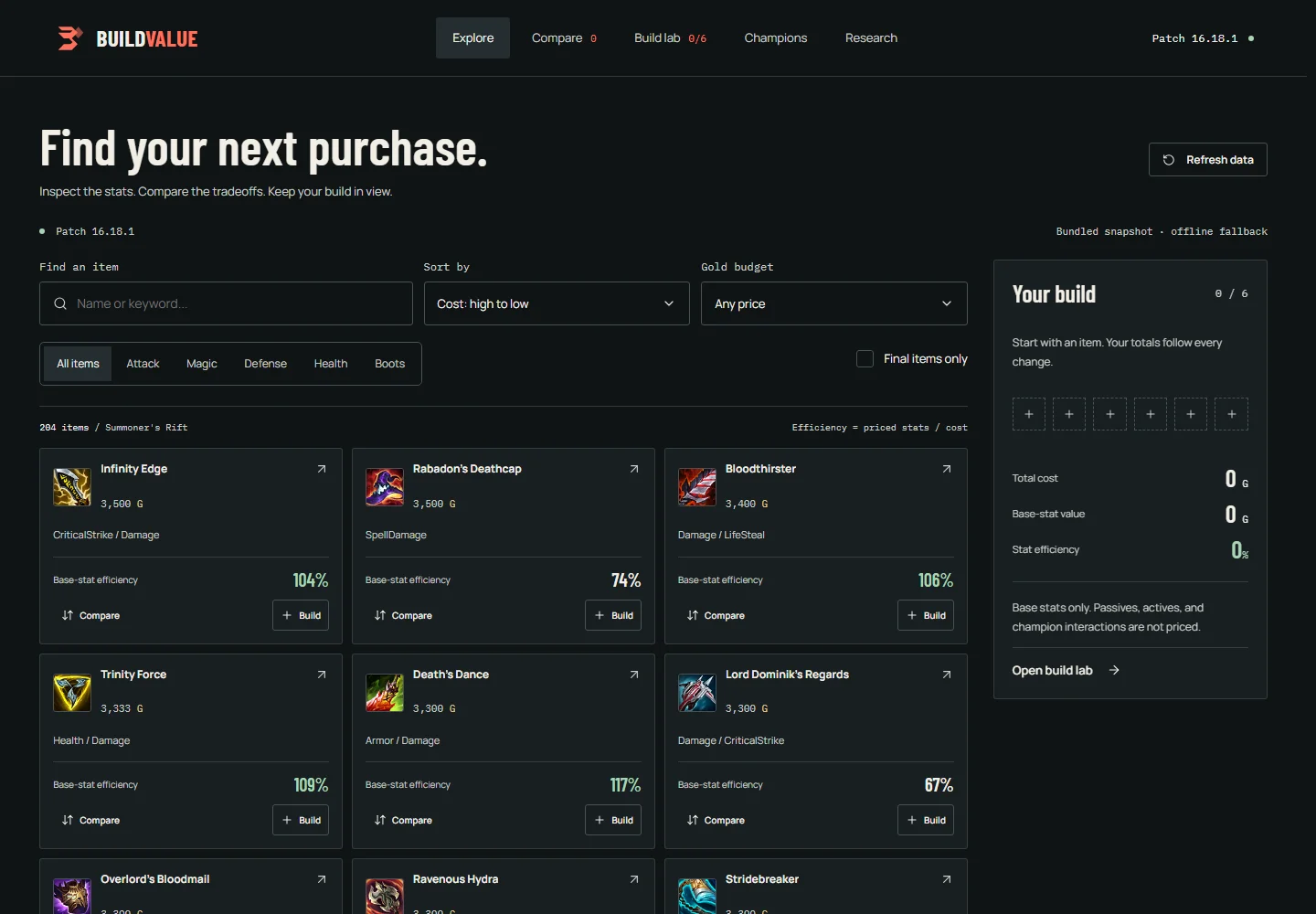
BuildValue is a League of Legends item workspace by Chrisdalbano. It uses the published @chrisdalbano/forza-ui package for its controls and overlays. Game data and calculations belong to the application and its existing backend.
What the integration covers
- Search and filter items while keeping a six-slot build visible.
- Compare costs, stats, and descriptions against a selected baseline.
- Save named builds locally, undo draft changes, and share item-ID links.
- Preview item details on hover or keyboard focus, then inspect recipes and cached effect studies in a drawer.
- Switch between cards and a dense table, search by stat, swap selected items, and rename saved builds.
- Explore champion studies and research, with generated hypotheses labeled separately from calculated values.
- Find a starting build within a budget using backend-calculated base-stat values.
This is an independent application, not an endorsement or collaboration with Riot Games. It was developed with AI assistance, including generated code and copy.
Component boundaries
| Responsibility | Forza supplies | BuildValue owns |
|---|---|---|
| Search and filters | FzField, FzSelect, FzSegmented, FzCheckbox | Query state and derived results |
| Item actions | FzButton, FzIcon | Add, compare, and inspect actions |
| Build mutations | FzList | Stable IDs, six-slot limit, totals, undo |
| Item details | FzDrawer, FzBadge | Recipe and analysis content |
| Save and share | FzDialog, FzField | Storage, validation, clipboard feedback |
| Budget planning | FzSlider, FzSelect | Budget constraints and selection algorithm |
| Catalog paging | FzPagination | Filtered count and sliced results |
| Loading and failure | FzAlert, button loading state | Requests, cancellation, retry |
The integration uses the existing library contracts. It does not add League-specific props or dependencies to Forza.
Install and scope the theme
npm install @chrisdalbano/forza-ui<script setup lang="ts">
import { ConfigProvider } from 'reka-ui'
import '@chrisdalbano/forza-ui/style.css'
</script>
<template>
<ConfigProvider :scroll-body="false">
<div class="fz-theme">
<RouterView />
</div>
</ConfigProvider>
</template>BuildValue reserves scrollbar space with scrollbar-gutter: stable. The provider disables duplicate body compensation. Focus trapping and scroll locking remain active. Keep theme ancestors free of transforms and clipping; clip decorative landing artwork inside its own section.
Keep application state outside controls
The workspace provider owns item IDs and named builds. Components receive typed data and call explicit actions. Totals and filtered lists are computed from the catalog and selection; they are not stored as competing copies.
<script setup lang="ts">
import { computed, ref } from 'vue'
import { FzButton, FzList } from '@chrisdalbano/forza-ui'

interface Item { id: string; name: string; cost: number }
const props = defineProps<{ items: readonly Item[] }>()
const selectedIds = ref<string[]>([])
const selected = computed(() =>
  props.items.filter(item => selectedIds.value.includes(item.id))
)
function remove(id: string) {
  selectedIds.value = selectedIds.value.filter(value => value !== id)
}
</script>

<template>
  <FzList :items="selected" label="Current build">
    <template #default="{ item }">
      <span>{{ item.name }}</span>
      <FzButton
        variant="ghost"
        size="sm"
        :aria-label="`Remove ${item.name}`"
        @click="remove(item.id)"
      >Remove</FzButton>
    </template>
    <template #empty>Choose an item to start.</template>
  </FzList>
</template>The full application also validates stored IDs, limits selection to six unique items, catches storage failures, and maintains an undo snapshot. Existing saved builds are migrated without deleting the old storage record.
Data and motion
BuildValue displays the backend's calculated item values. Its bundled fallback is a captured API response with a patch and timestamp, not invented demo data. AI-generated effect estimates remain separate from formula-based totals.
GSAP is loaded only by the landing components. Application controls use Forza's motion behavior. Landing animations clean up on navigation and respect reduced motion. Repeatedly opening a study reads cached analysis; it does not trigger paid generation.
Consumer checks
The application tests search, comparison, persistence, legacy migration, share validation, budget limits, analysis handoffs, overlay geometry, and keyboard focus restoration. It also checks seven routes at mobile, tablet, and desktop widths and exercises the built app offline.
These are consumer checks, not a claim that every possible application or assistive technology has been tested. Run the same kinds of checks against your own data and workflows.
Preserve application features during a redesign
A component migration needs a feature checklist alongside the new design. BuildValue's first Forza pass omitted hover previews and parts of the AI explanation, even though the backend and main routes still worked. A follow-up source comparison restored those interactions and added regression checks.
The application composes Reka HoverCard primitives into an item-specific preview using Forza tokens. Hovering is read-only and performs no AI request. Pointer transit keeps the preview open while it is being read, Escape dismisses it, and touch users open the full item details with one tap. This wrapper lives in BuildValue; it is not an exported Forza component.
The AI panel renders returned estimates, alternative stat equivalents, reasoning, confidence, and champion explanations. Pending, failed, empty, and ready results have distinct presentations. Estimates remain separate from the formula-based totals. Tests cover these states with fixtures; production-preview checks also use real cached responses.